- 3
- schedule periods Daily, weekly, monthly
- 3
- file formats PDF, CSV, Excel
- 24 mo
- default retention Adjustable at commissioning
- 0 €
- extra charge Reporting is included in the licence
How does automated reporting replace a hand-built Excel report?
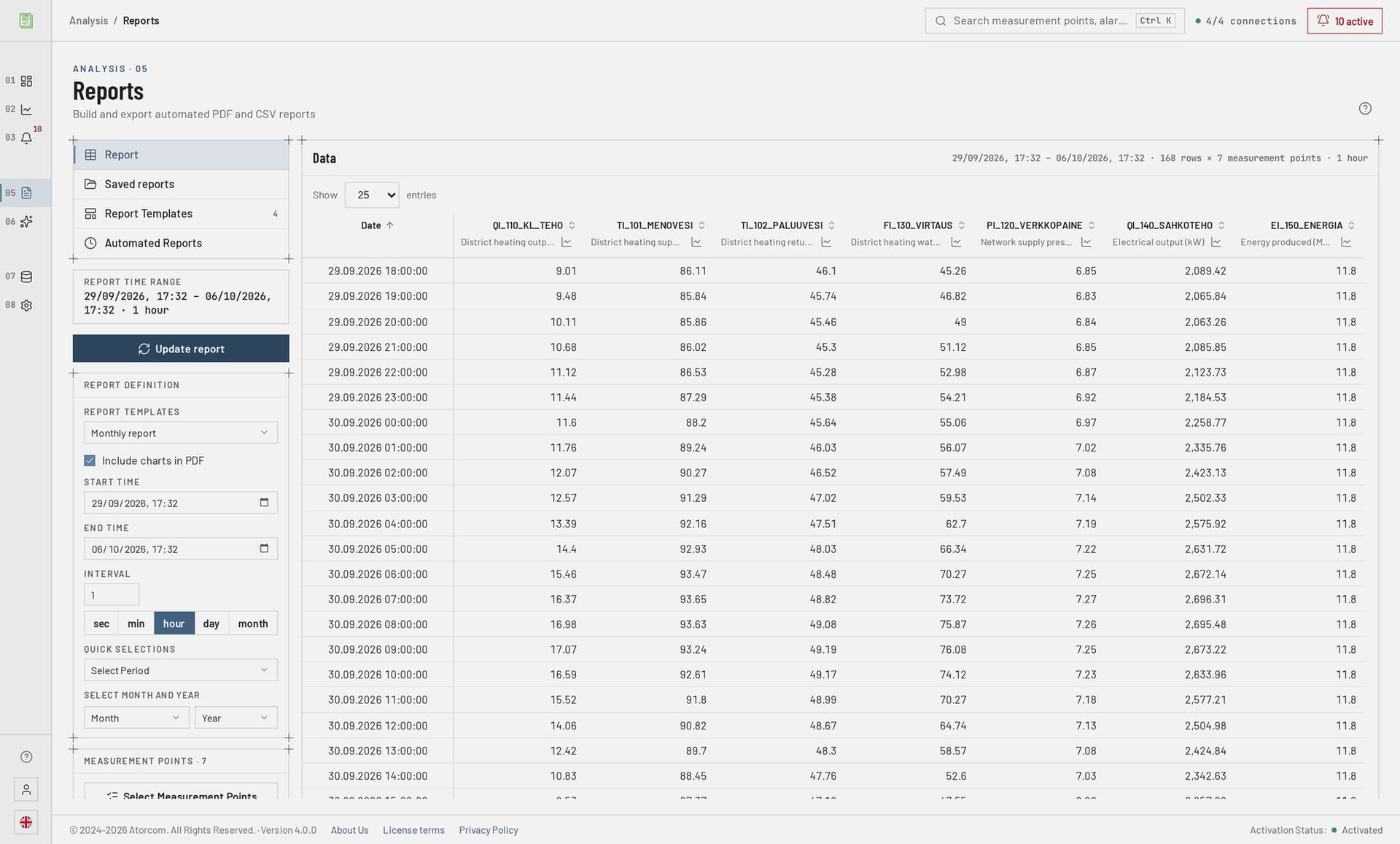
A hand-built report requires the data to be extracted and the formulas and formatting to be redone every month. DataPortia reads the values straight from its own time-series database over the chosen time range and produces a finished file at a defined time of day. The definition is made once — measurement points, time range, calculation points and template — and it repeats identically every period. What is left for a person to do is read the report.
In detail: where the figures in the report come from
The data comes from the same PostgreSQL 18 + TimescaleDB database that OPC UA data acquisition writes to, so the figures in the report are the same ones shown in the trend view. Acquisition takes in more than 2 000 values per second, so the coverage of a report does not depend on whether someone manages to pick the values out in time. Reporting belongs to the same installation as the other parts of DataPortia.
Can I use our company's own report template?
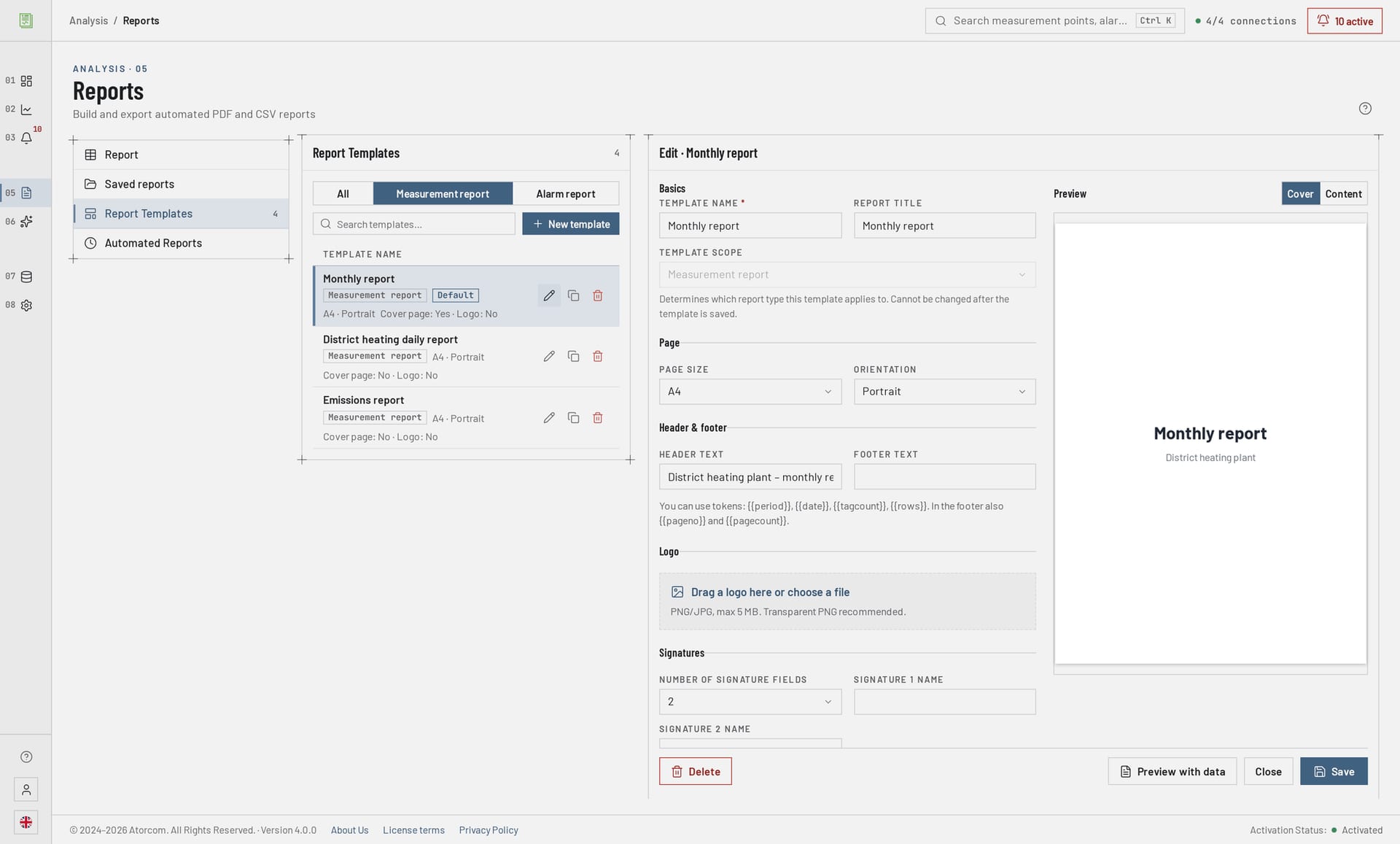
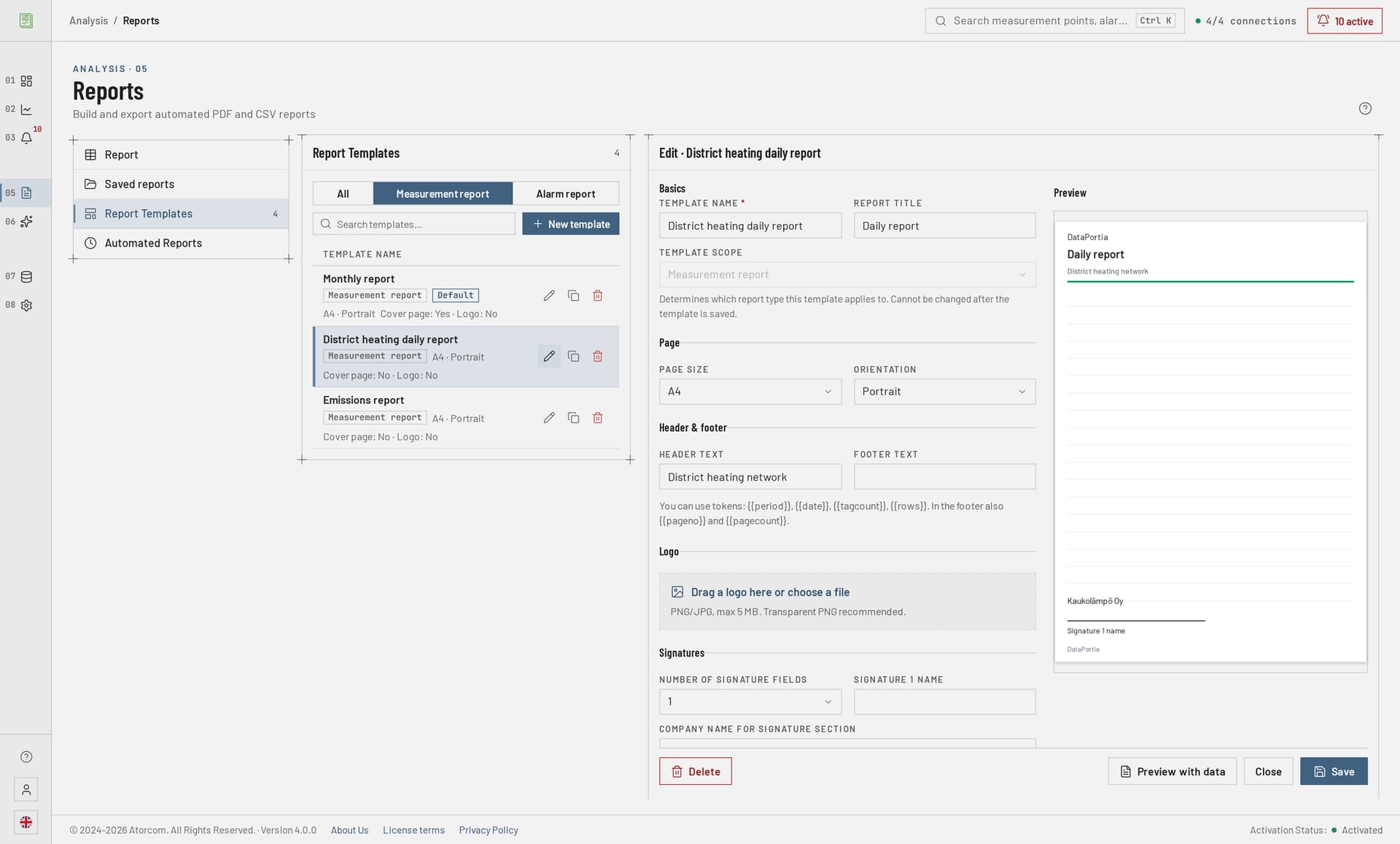
Yes. The report template defines the report title, the header and footer, the company logo, the page size and the signature fields, and every report run on it follows the same layout. There can be several templates, for example one for each plant or each customer. The template is made once at commissioning, after which a scheduled run uses it with no further work.
In detail: what is defined in the template
- Title and time range
- The report title and the time range that was run are printed at the start of the report.
- Logo, header and footer
- Your own logo and the header and footer on the report pages.
- Page size
- Chosen per template, so that the printed report matches the rest of your documentation.
- Signatures
- Signature fields for approvers, ready in every run.
Can reports be scheduled?
Yes. Scheduling is daily, weekly or monthly: the report is run at a chosen time from the previous period's data and saved in the chosen format. Several scheduled reports can run alongside each other, on different measurement points and different templates. The same time range can also be run and exported by hand from the report view, for example after a fault or when a period has to be looked at again.
Where are the finished reports?
A scheduled report is produced automatically and stays in the list of saved reports in the browser interface, from where it can be opened and exported as a file in PDF, CSV or Excel format. Sign-in to the interface is either with a local account or with Azure AD / Microsoft Entra ID authentication. The same report can also be fetched from that same view immediately after a period has been run by hand.
What calculated values can a report contain?
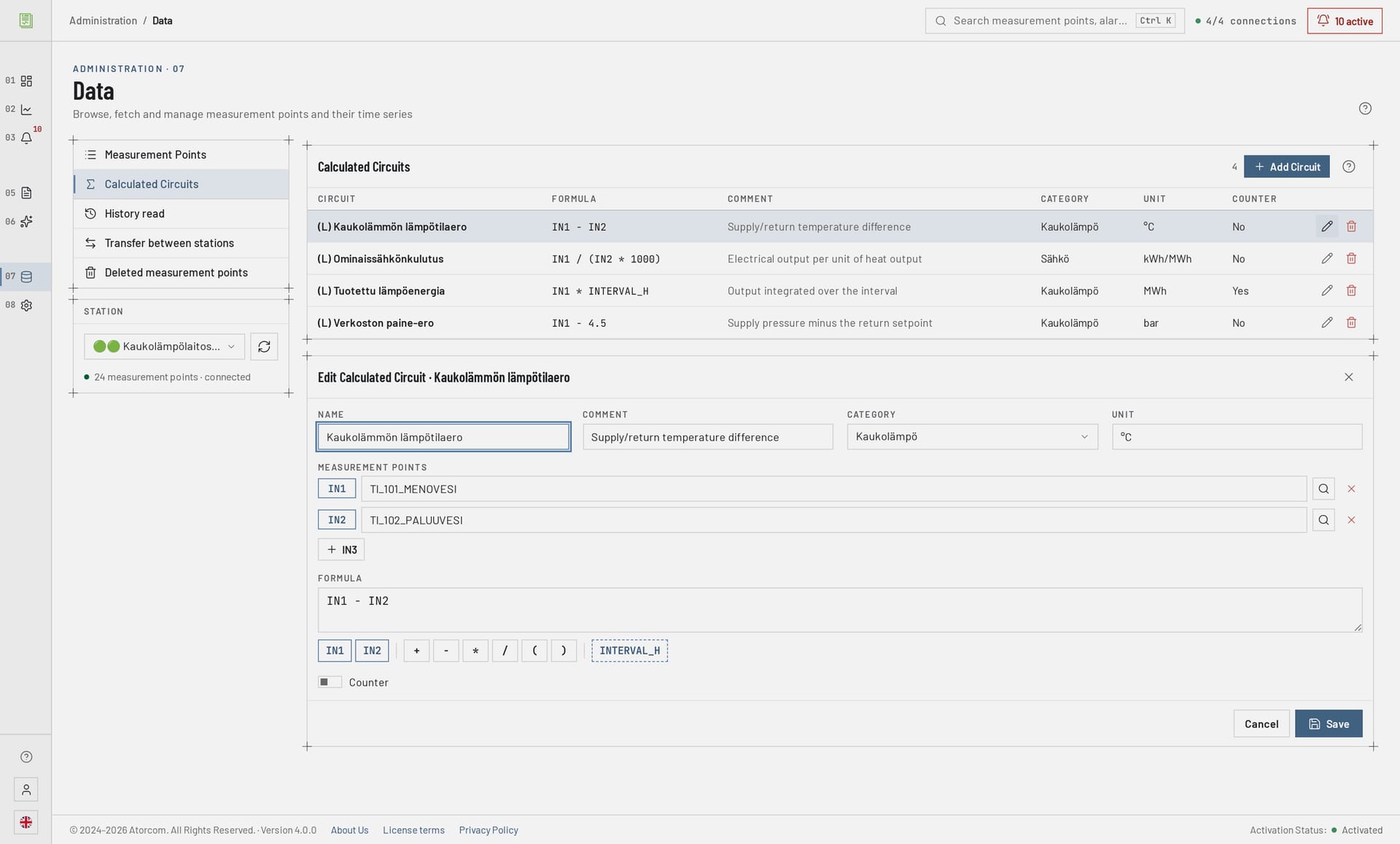
Besides the values of measurement points, a report can contain calculation points: formula-based derived measurement points that are defined once and calculated over the report's time range. A typical example is energy (kWh) accumulated from instantaneous power (kW). The calculation adapts automatically to the report's time range, so the same point works in both a daily and a monthly report. The same point can be attached to several different reports.
kWh = IN1 * INTERVAL_H
How long a period can a report be run for?
A report can be run over any time range for which there is data in the database. The practical limit is the retention period of the database, which is adjustable and 24 months by default. At commissioning, history can be imported backwards from the OPC UA historical register, in which case the first report already covers a past period.
In detail: retention period and disk space sizing
If a reporting obligation reaches further back than the default, the retention period is raised at commissioning. Disk space grows directly with the retention period, so the sizing is worth calculating with your own daily volume — the figures and the effect of compression are on the OPC UA data acquisition page.
| File formats | PDF, CSV, Excel (XLSX) |
|---|---|
| Schedule periods | daily, weekly, monthly |
| Report template | title, logo, header and footer, page size, signature fields |
| Retention period | adjustable, default 24 months |
| History import | from the OPC UA historical register; gap-based reading skips periods already imported |
| Database | PostgreSQL 18 + TimescaleDB |
Is a report acceptable for regulatory reporting?
Acceptance is always decided by the receiving authority, not by the software. DataPortia gives the report content what submissions usually require: the figures come from the same database the measurements are written to, the layout is standardised by your own template and signature fields, and a machine-readable CSV or Excel file can be added as an attachment. The content requirements are worth checking with the recipient before commissioning.
DataPortia is installed on your own server, so the data and the reports stay inside the building; the browser connection is protected by HTTPS with automatic certificates.
Does the same template also work for alarm reports?
Yes. The same report template — logo, header and footer, page size and signature fields — also suits alarm and event reports, and they are scheduled the same way, daily, weekly or monthly. A report can carry Pareto, duration and severity analyses as well as sequence-of-events (SOE) analysis of the events. The timestamp is the one the automation server gave — it is not truncated on export.
In detail: milliseconds in post-fault investigation
Millisecond precision is kept both on screen and on export, so a post-fault investigation can be done from the same file. The details of the alarm side are on the alarms and events page.
Frequently asked questions
These are the questions that come up most often about reporting. If your own question is not on the list, we answer it directly and tell you at the same time what it means for your measurement points.
Is a separate server needed for reporting?
No. Reporting belongs to the same installation as data acquisition. The minimum requirement is 8 GB of RAM (16–32 GB recommended) and a 100 GB SSD. The operating system can be Windows 10/11, Windows Server 2016 or newer, or Linux (Debian, Ubuntu).
Can the report data be fetched into another system?
Yes. A read-only REST API and HMAC-signed webhooks are available. The limits, keys and usage are described on the integrations page.
Can old data be imported into reports after commissioning?
Yes, if the automation system keeps an OPC UA historical register. The import reads gap-based and skips periods already imported, so the same period can be run again without duplicate entries.
Is reporting charged separately?
No. Licensing is by tier: 7 perpetual and 7 floating tiers, starting at a 4 000 € perpetual licence, and the price scales with the number of OPC UA connections. Only the AI module is priced separately (499 €).
Can a report or an alarm be sent by text message?
In development Text message alarms are under development. The feature has not been tested and is not available, so it must not be counted on for commissioning.
If reports are compiled by hand today, the quickest way to judge the benefit is to take one existing report and build a template from it. The trial period lasts 30 days, covers every feature apart from the HA add-on and commits you to nothing. Send your current report template in advance and we will go through whether it reproduces as it is.
How do I see this on my own reports?
The quickest way to judge the benefit is to take one current hand-built report and see whether the same one comes out automatically. The trial period lasts 30 days, includes every feature apart from the HA add-on and commits you to nothing: the installation is made on the plant’s own server, your own template is used as the report template and the first run is gone through together. Licences start at a 4 000 € perpetual licence, and the price scales with the number of OPC UA connections.