- 120
- requests / min Rate limit per API key
- 24
- months Retention period default, adjustable
- 0
- write operations The API is read-only
How is DataPortia's data transferred to other systems?
Data can be taken out in three ways. REST API v1 answers queries and authenticates with an API key. Webhooks push an event to the receiver the moment it happens, HMAC-signed. Scheduled reports produce the same data ready as a file (PDF, CSV or XLSX) on a daily, weekly or monthly rhythm. All traffic goes over HTTPS with automatically managed certificates.
| Method | Direction | Authentication | Typical use |
|---|---|---|---|
| REST API v1 | receiver pulls | API key | BI reports, MES queries, ad hoc searches |
| Webhook | DataPortia pushes | HMAC signature | forwarding alarms, event-driven integrations |
| Report export | scheduled file | — | PDF, CSV or XLSX on a daily, weekly or monthly rhythm |
What data does REST API v1 return?
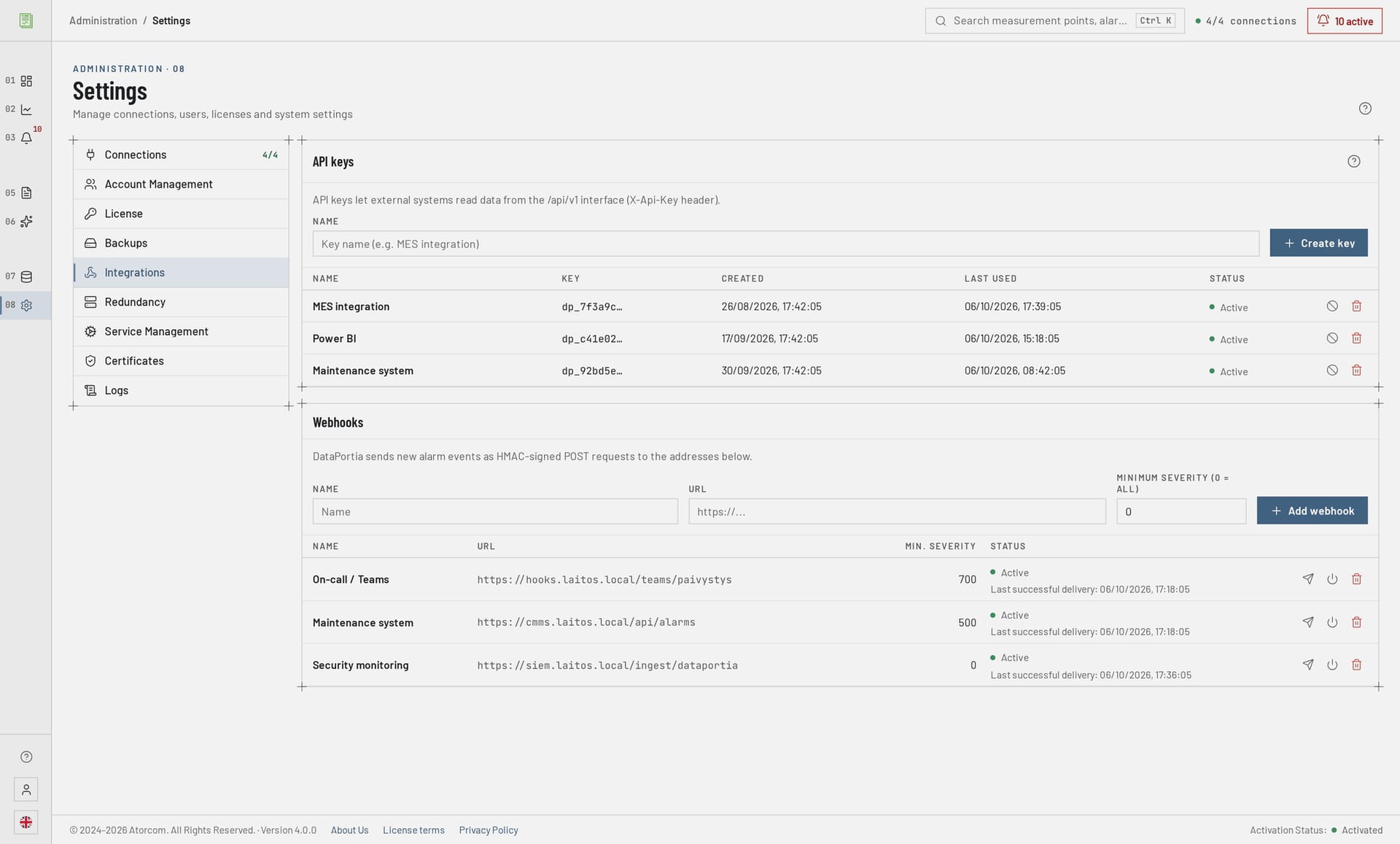
Measurement data, alarms and system status are read from the API. Every call authenticates with an API key, and 120 requests per minute are allowed for a single key. There are no write operations at all: the API does not change measurement points, does not acknowledge alarms and does not touch automation values. Traffic goes over HTTPS, and the responses come from the same TimescaleDB database that acquisition writes to.
In detail: timestamps and the order of events
The original timestamp of an alarm is kept intact to millisecond precision, so the order of events stays correct in the receiving system too. The handling of alarms is described on the page Alarms and events.
Can the API write values into automation?
It cannot. REST API v1 is read-only: it does not write values to the OPC UA server, does not acknowledge alarms and does not change settings. Setpoints and acknowledgements still travel by the automation system's own route. The limitation is a deliberate security choice: a leaked API key exposes measurement data, but gives no access to process control.
Read-only is a limitation, not a shortcoming. It keeps the attack surface of the reporting system small: in the worst case data is lost, not control rights.
In detail: in which direction DataPortia communicates
In practice DataPortia acts as a read-only client on the automation network. It reads data and history from the OPC UA server, but writes nothing there. If an integration plan has an arrow back into the process, that arrow does not run through this API. The acquisition end is described on the page OPC UA data acquisition.
Can I get the data into Power BI?
You can. Power BI and other BI tools read the API as an ordinary HTTP source: the API key is attached to the query, and the report is refreshed on a schedule. Size the refresh rhythm according to the rate limit — 120 requests per minute are allowed for a single key. The limit is ample for a scheduled report, but not for a loop that fetches every measurement point with a call of its own.
In detail: sizing the refresh rhythm, and export to Excel
Restrict the time window of the refresh to new data and do not request the whole history again on every run. That way the same report stays within the rate limit even when more points are added.
If the receiver is Excel rather than a BI server, a scheduled report export is often simpler: DataPortia produces the XLSX or CSV file ready and no key needs to be maintained. See Reporting.
How do API keys and rate limits work?
A key identifies the calling system and also carries the rate limit: 120 requests per minute per key. Give every integration a key of its own — then the load can be followed system by system, and revoking one key leaves the others as they were. The limit is counted per key, so queries from MES and BI do not eat into each other's budget.
In detail: key, rate limit, read-only and the webhook secret
- API key
- An identifier that distinguishes the calling system. A revoked key stops working, and the other keys are not disturbed by it.
- Rate limit
- 120 requests per minute per key. The limit is per key, so separate keys keep the loads of MES and BI apart.
- Read-only
- The API has no write operations. A key gives access to read data, not to change anything.
- Webhook secret
- A shared secret with which DataPortia signs outgoing deliveries and against which the receiver checks them.
How do I make sure a webhook came from DataPortia?
Every webhook delivery is HMAC-signed with a shared secret. The receiver calculates the same digest from the body it received and compares it with the signature that came with it. If they do not match, the request must be rejected. Failed deliveries are retried automatically, so a receiver that was down for a moment does not mean a lost event. The check is made before the body is processed.
In detail: checking the signature step by step
- Keep the shared secret at the receiving end as you would a password — not in version control, not in the log.
- Calculate the HMAC from the body of the incoming request as it is, before you parse it. A re-serialised body gives a different digest.
- Compare the calculated and the received signature with a constant-time comparison.
- Reject the request if the signatures do not match. Do not process first and check afterwards.
- Make the processing idempotent: a retry may bring the same event a second time if your response was lost on the way.
When is the API not enough?
The API does not suit process control or a continuous real-time feed. Nor does it return data that no longer exists: the retention period is adjustable and 24 months by default. If the receiving system needs thousands of points on a short cycle, size the queries and the time windows in advance, before the integration is taken into production.
In detail: acquisition throughput and preparing for a server failure
The acquisition end and the API end are worth keeping in mind separately. DataPortia takes in over 2 000 values per second and writes them into the TimescaleDB database, but the REST API is intended for structured queries, not for forwarding that same stream onwards. If the integration has to survive a server failure, read High availability.
2 000values / sThe acquisition end and the API end are worth keeping in mind separately
Frequently asked questions
Below are integrators' most common questions about the API: network connection, length of history, receiver outages, revoking a key and forwarding alarms out. The answers stay with what is in the product today, and anything in development is marked separately. The overall picture of the product is on the page DataPortia.
Does the API work without an internet connection?
Yes. DataPortia is on-premises software and serves the API from its own Kestrel server over HTTPS. The caller has to be on the same network or otherwise able to reach the server — and the webhook receiver in turn has to be reachable from the server. No cloud service is needed in either direction.
How far back into history does the API reach?
As far as the retention period. The default is 24 months and the value is adjustable to the plant's need. Compression saves disk space; it does not restrict the time range from which data can be fetched. Retention and compression are described in more detail on the page OPC UA data acquisition.
What happens if the receiving system is down for a while?
Webhook deliveries are retried automatically. On the REST API side an outage loses nothing: the data is in the database, and the caller fetches the missing time range when the connection comes back. Because of the retries, the receiver's processing has to tolerate the same event twice.
Can a key be revoked part-way through?
It can. A key is an integration-specific identifier, and revoking it cuts off only the calls made with it. Because the limit and the identity are per key, the calls of other systems continue unchanged. This is the practical reason to give every system a key of its own right from the start.
Can alarms be sent as a text message?
In development Text message alarms have not been able to be tested, and the feature is not available. So do not plan on it. At present forwarding alarms out is handled with a webhook to the receiving system, which takes care of its own messaging.
How do I get to try the API?
The trial version is 30 days, all features apart from the HA add-on, and no commitment. Install it in your own environment, create an API key and run the first query with your own tool — whether the integration is fit for purpose becomes clear faster with real data than by reading documentation. Licences start at 4 000 € as a perpetual licence. If there is something in your integration that this page does not answer, ask us directly.