- 3
- levels OPC UA, database, application
- 15–30 s
- failover time Application-level failover
- 2 000+
- values / s Write throughput
- 8 GB
- RAM / server Minimum requirement
Will I lose data if a server crashes?
It depends on what crashes. If the database disappears for a moment, no gap is left in the time series at all: DataPortia buffers the values in memory and writes them afterwards, once the connection returns. If the DataPortia server itself crashes, acquisition stops for as long as it takes the standby server to take over.
The memory buffer holds at most 120 000 records per connection — about 10 minutes at a full load of a one-second interval and 200 measurement points. For alarms and events the buffer defaults to 50 000 events. A database outage longer than that starts to leave a gap.
In detail: how gap-based history import works
A gap left by an application-level failover can be patched afterwards. History import reads the values from the automation system's own OPC UA history store. The read is gap-based: it fetches only the missing periods and skips those already imported, so the same data is never duplicated. This requires that the automation system itself retains history — DataPortia cannot read values that are not stored anywhere. Configuring the import is described on the OPC UA data acquisition page.
10minAt a full load of a one-second interval and 200 measurement points
What does redundancy cover in DataPortia?
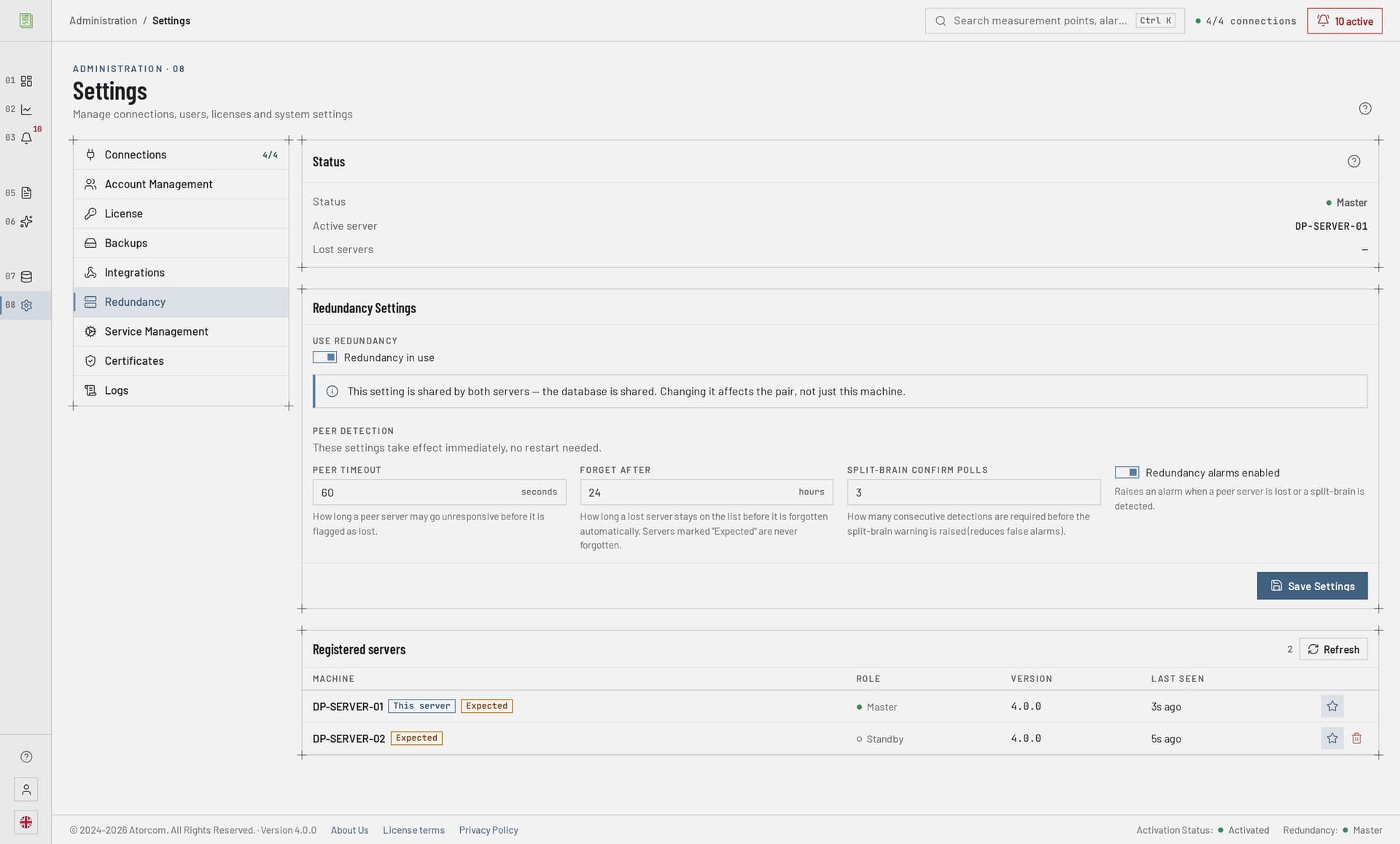
Redundancy covers three separate levels. At the OPC UA level, every connection can be given a redundant server pair, and the switch between them is automatic. At the database level, PostgreSQL replicates the data to a second machine using streaming replication, and the failover can be automated with DataPortia's own DPFC controller. At the application level, a second DataPortia server waits in standby and takes over acquisition in 15–30 seconds if the active one stops responding. The levels are independent of each other: you can take one, two or all three into use.
Table: what each level protects
| Level | Mechanism | What it protects |
|---|---|---|
| OPC UA connection | Redundant server pair per connection, automatic failover | A fault in the automation system's OPC UA server, or a network outage |
| Database | PostgreSQL physical streaming replication; automatic failover with DPFC, pg_auto_failover or Patroni | A disk, machine or operating system fault on the database server |
| Application | Active-passive configuration, failover time 15–30 s. Requires the HA add-on licence | A DataPortia server crash or a planned maintenance break |
Terms: redundant server pair, streaming replication, active-passive
- Redundant server pair
- Two OPC UA server addresses behind the same connection. If the primary does not respond, the connection moves to the other one without any user action.
- Streaming replication
- PostgreSQL's own method, in which the transaction log is shipped as a continuous stream to a second database server.
- Active-passive
- Only one DataPortia server acquires data at a time. The standby server shows the user interface normally, but its OPC UA acquisition and alarm subscriptions are switched off until it takes over.
- DPFC
- DataPortia Failover Controller. Atorcom's own separate program that monitors the PostgreSQL pair and handles the failover automatically — on Windows as well.
What happens when an OPC UA server does not respond?
Every OPC UA connection can be given two server addresses. When the primary stops responding, DataPortia moves the connection to the standby address automatically and carries on reading the subscriptions from there without any user action. The setting is made per connection, so not every connection has to be made redundant. The failover requires no changes to the automation system.
In detail: what this level protects and what it does not
This level protects against a fault at the automation end: a crashed OPC UA server, a replaced process station or a broken network route. It does not protect against a fault in DataPortia itself — that needs the application-level pair. A redundant server pair requires that the automation system really does have a second OPC UA server: DataPortia does not create one, it uses what already exists. Configuring connections is described on the OPC UA data acquisition page.
How is the database protected against a server fault?
DataPortia stores its data in PostgreSQL 18 and TimescaleDB. Fault tolerance is handled with PostgreSQL's own physical streaming replication, in which the data is written continuously to a second database server. TimescaleDB specifically requires physical replication — logical replication does not support all of its internal structures. Replication is continuous, not a scheduled backup.
Both database nodes must run exactly the same PostgreSQL 18 and TimescaleDB version. Physical replication does not work between different versions. In addition, max_connections has to be raised to at least 150, because two DataPortia instances together reserve about 120 connections.
In detail: standard technology and sizing the replication link
The database level is established PostgreSQL technology, not a product-specific arrangement. That is a good thing: the cluster is managed with familiar tools, and a database specialist maintains it without separate training. The flip side is that the failover logic belongs to the database side — DataPortia works with it, but does not replace it.
Size the replication link according to the write volume: throughput is 2 000+ values per second, that is at most 172 million rows per day. Compression and retention periods are covered on the OPC UA data acquisition page; what passes through replication is in any case the fresh, uncompressed write stream.
What is the DataPortia Failover Controller?
DPFC is Atorcom's own separate program that monitors the PostgreSQL pair and handles the failover automatically. Its most important difference from the ready-made tools is the platform: pg_auto_failover and Patroni are Linux-centric and do not support Windows, so in a Windows environment automatic database failover was previously not an option at all. DPFC brings it there too.
In detail: why a witness node, and what it does not solve
DPFC runs as a separate process, not inside DataPortia. The reason is simple: when the primary database is down, DataPortia itself is either down or on its way down — the component whose job is to notice that cannot live inside the failing program.
The recommended configuration is three DPFC processes: one on each database node and one on a separate witness node that decides which node is primary. A light machine is enough for the witness node. If the witness node is down, automatic failover does not happen — the databases themselves keep running normally and the failover can be done by hand. The same limitation applies to pg_auto_failover's own monitor.
| Option | Platform | Failover |
|---|---|---|
| Scripted replication | Windows and Linux | Manual promote command |
| pg_auto_failover or Patroni | Linux only | Automatic |
| DataPortia Failover Controller | Windows and Linux | Automatic |
How long does the outage last when a DataPortia server crashes?
It depends on how it crashes. If the DataPortia process crashes but the machine stays up, the operating system closes its database sessions and the leader lock is released immediately — the failover takes about 15–30 seconds. If the whole machine dies in a power or network outage, PostgreSQL only notices the dead session through the TCP keepalive mechanism, and with default settings that can take considerably longer.
A fast failover in a hard fault as well requires tuning the keepalive settings in postgresql.conf. Without that, the stated failover time applies only to a clean crash. The settings are covered at commissioning.
In detail: maintenance breaks, database failover time and timestamps
The same mechanism serves planned maintenance: the active server can be shut down and acquisition moves to the standby machine, so operating system updates and restarts no longer interrupt acquisition for hours. The failover time applies to the application level only — the database failover time depends on the cluster's own configuration.
A failover initialises connections the same way a normal start-up does: only those connections with Connect on start-up enabled are established automatically on the standby node. On production connections this setting has to be enabled, otherwise high availability does not work.
Alarms and events are stored with the automation server's original timestamp at millisecond precision, so material collected after a failover lands in the right place on the timeline and the moment of failover does not distort the order of events. More on the subject on the alarms and events page.
Do I need two servers?
No, not if the reporting can tolerate an outage of a few hours. One server is enough in the great majority of installations, and the OPC UA level redundant server pairs work in a single-server configuration as well. A second server is needed only when data acquisition has to continue through a fault or a maintenance break on the DataPortia machine. Redundancy at the application and database levels requires a second machine.
The minimum requirements apply to every server the software runs on: 8 GB RAM (16–32 GB recommended) and a 100 GB SSD.
In detail: what an outage costs
The number of servers is above all a question of what an outage costs. If the time series is part of regulatory reporting or invoicing, a gap is more expensive than a second machine. If the data drives maintenance and monthly monitoring, one server and careful backups are the right sizing. We go through the configuration at commissioning, so you do not have to decide the number of servers on your own.
What does high availability require at commissioning?
High availability is not a checkbox in the settings. It requires at least one additional server, the configuration of PostgreSQL replication, network planning and a decision on which connections are redundant. All three levels are configured separately, and they should also be tested separately before production use. None of this is exotic, but none of it happens by itself when the software is installed.
Limit 01
An application failover leaves a gap
A short database outage leaves no gap — the memory buffer covers it. An application server crash does leave one.
Limit 02
The automation end decides
A redundant server pair requires a second OPC UA server in the automation system.
Limit 03
The database is work of its own
A failover cluster is PostgreSQL expertise, not a DataPortia settings page.
In detail: the maintenance workload
If the environment already has PostgreSQL expertise or a ready-made cluster, DataPortia settles on top of it. If it does not, count in the maintenance workload as well — a two-server configuration is permanently more to manage than a single one.
Frequently asked questions about redundancy
Redundancy is a matter of configuration, sized according to the length of outage that is acceptable, not the same for everyone by default. Below are short answers to the questions that keep coming up when high availability is discussed: is a different software version needed, can redundancy be added afterwards, what does it cost and can the configuration be tested before buying.
Does high availability need a different software version?
No. The functions are in the same software, and we go through the configuration at commissioning.
Can redundancy be added later?
Redundancy is a matter of configuration, so it can also be built on top of an existing installation. In practice it means a new server and rethinking the database level, so tell us about the plan sooner rather than later.
Does DataPortia work with pg_auto_failover or Patroni?
Yes. The database level is based on PostgreSQL's own streaming replication, so pg_auto_failover and Patroni both work. They only run on Linux, however. In a Windows environment the automatic failover is done with DataPortia's own DPFC controller — the alternative is scripted replication and a promote command given by hand.
Are alarms lost during a failover?
Not in a database outage: alarm and event subscriptions buffer 50 000 events in memory by default and flush the buffer once the connection returns. If the application server crashes, events occurring during the failover are not collected. Collected alarms keep the automation server's original millisecond timestamp. DataPortia is a reporting system: the primary handling of alarms belongs to the automation system, not to reporting software.
What does high availability cost?
Three items: extra hardware, configuration work and licences. Redundancy at the application level requires a separate HA add-on licence, licensed per installation — one licence covers the whole pair. On top of that the base licence is tied to the hardware, so each server needs its own base licence. A floating licence does not replace this: it too is licensed per installation. Tell us about your environment and we will work out the total.
Can the configuration be tested before buying?
Partly. The trial is 30 days with no commitment, but the HA add-on is not included in the trial period — the redundancy switch cannot be turned on in the trial version. Data acquisition, reporting and everything else can be tested normally, and we go through the high availability configuration with you separately.
If data acquisition has to continue even when something breaks, go through the environment before installation: how many OPC UA servers are available, what is already running on the database side and how long an outage is acceptable.
Other areas: reporting, integrations and the DataPortia overview.
How should redundancy be sized?
The trial period lasts 30 days and includes every feature apart from the HA add-on, so data acquisition and reporting can first be proven on a single server. Redundancy is sized after that, and three facts are enough for it: how many OPC UA servers are available, what is already running on the database side and how long an outage is acceptable. Licences start at a 4 000 € perpetual licence and the HA add-on is 1 000 €.